Watchlists - Inform Subscription Owner
Browse: 🏠 · Solutions · Connectors · Methods · Tables · Content · Parsers · ASIM Parsers · ASIM Products · Logic Apps · 📊
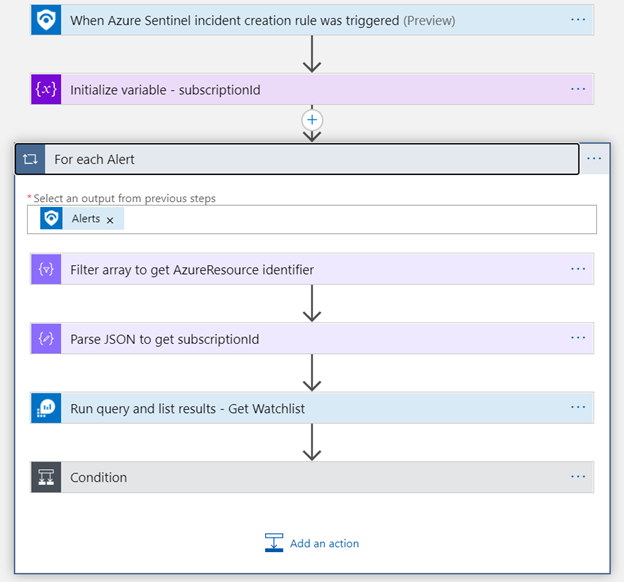
This playbook leverages Microsoft Sentinel Watchlists in order to get the relevant subscription owner contact details, and inform about an ASC alert that occured in that subscription. It uses Microsoft Teams and Office 365 Outlook as ways to inform the sub owner.
| Attribute | Value |
|---|---|
| Type | Playbook |
| Solution | Watchlists Utilities |
| Source | View on GitHub |
Logic App Connectors
This playbook uses 4 Logic App connectors / built-in actions:
| Connector / Action | Type | Connections | Actions |
|---|---|---|---|
azuremonitorlogs |
Managed | 1 | 1 |
azuresentinel |
Managed | 1 | 0 |
office365 |
Managed | 1 | 1 |
teams |
Managed | 1 | 1 |
Action parameters (URLs, paths, function IDs)
azuremonitorlogs (Managed)
| Action | Method | Endpoint | Other |
|---|---|---|---|
| Run_query_and_list_results_-_Get_Watchlist | post | /queryData |
— |
office365 (Managed)
| Action | Method | Endpoint | Other |
|---|---|---|---|
| Send_an_email_(V2) | post | /v2/Mail |
— |
teams (Managed)
| Action | Method | Endpoint | Other |
|---|---|---|---|
| Post_a_message_as_the_Flow_bot_to_a_user | post | /flowbot/actions/notification/recipienttypes/user |
— |
Additional Documentation
📄 Source: Watchlist-InformSubowner-IncidentTrigger/readme.md
Watchlists-InformSubowner-IncidentTrigger
author: Lior Tamir
This playbook leverages Microsoft Sentinel Watchlists in order to get the relevant subscription owner contact details, and inform about an ASC alert that occured in that subscription. It uses Microsoft Teams and Office 365 Outlook as ways to inform the sub owner.
Prerequisites
Create a Watchlist that this playbook will query: 1.Create an input comma-separated value (CSV) file with the following columns: SubscriptionId, SubscriptionName, OwnerName, OwnerEmail, where each row represents a subscription in an Azure tenant. 2. Upload the table to the Microsoft Sentinel Watchlist area. Make a note of the value you use as the Watchlist Alias, as you'll use it to query this watchlist from the playbook.
Note: This playbook utilizes two features currently in Preview.
- Microsoft Sentinel Watchlists
- Microsoft Sentinel Incident Trigger
Browse: 🏠 · Solutions · Connectors · Methods · Tables · Content · Parsers · ASIM Parsers · ASIM Products · Logic Apps · 📊