Watchlist - close incidents with safe IPs
Browse: 🏠 · Solutions · Connectors · Methods · Tables · Content · Parsers · ASIM Parsers · ASIM Products · Logic Apps · 📊
This playbook leverages Microsoft Sentinel Watchlists in order to close incidents which include IP addresses considered safe.
| Attribute | Value |
|---|---|
| Type | Playbook |
| Solution | Watchlists Utilities |
| Source | View on GitHub |
Logic App Connectors
This playbook uses 2 Logic App connectors / built-in actions:
| Connector / Action | Type | Connections | Actions |
|---|---|---|---|
azuremonitorlogs |
Managed | 1 | 1 |
azuresentinel |
Managed | 1 | 3 |
Action parameters (URLs, paths, function IDs)
azuremonitorlogs (Managed)
| Action | Method | Endpoint | Other |
|---|---|---|---|
| Run_query_and_list_results | post | /queryData |
— |
azuresentinel (Managed)
| Action | Method | Endpoint | Other |
|---|---|---|---|
| Add_comment_to_incident_(V3) | post | /Incidents/Comment |
— |
| Update_incident | put | /Incidents |
— |
| Entities_-_Get_IPs | post | /entities/ip |
— |
Additional Documentation
Watchlists-CloseIncidentKnownIP
author: Lior Tamir
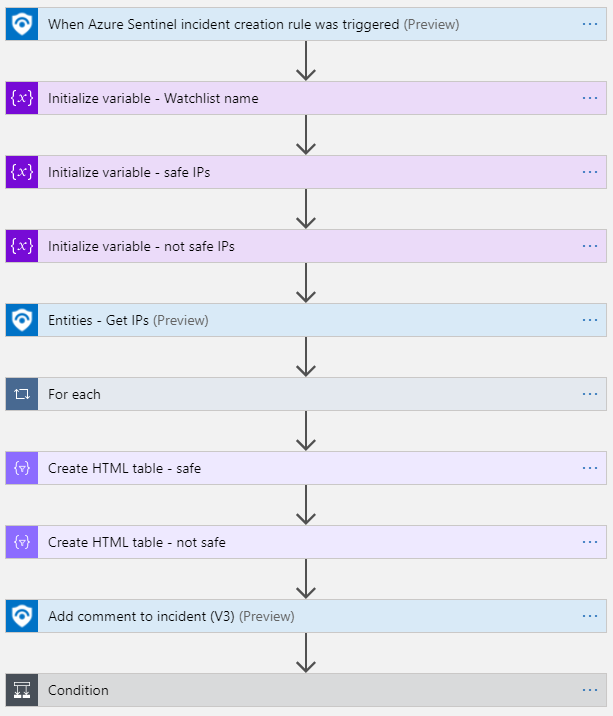
This playbook levarages Microsoft Sentinel Watchlists in order to close incidents which include IP addresses considered safe.
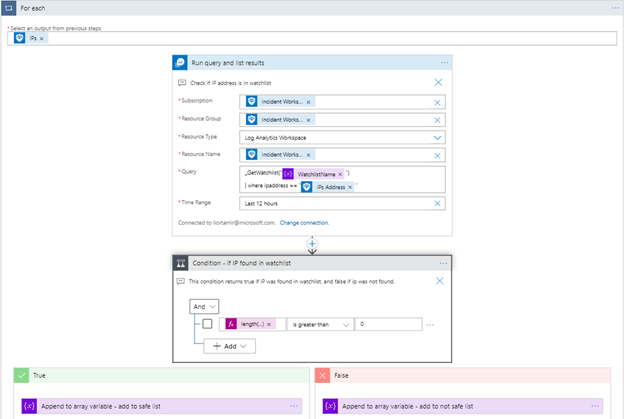
For each Ip address included in the alert (entities of type IP):
- Check if IP is included in watchlist.
- If IP is in the watchlist, consider the IP safe, Add it to Safe IPs array.
- If IP is not in the watchlist, meaning that we are not sure it is safe, Add it to not Safe IPs array.
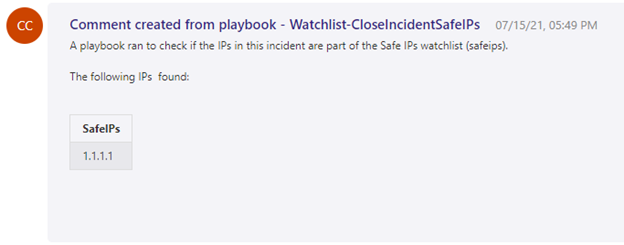
- Add a comment to the incident the list of safe and not safe IPs found.
- If the not safe list is empty (length == 0), close the incident as Benign Positive.
Prerequisites
Create a watchlist for safe IPs with ip column named 'ipaddress' (can be changed in 'Run query' step). Watchlist should be located in the same workspace of the incidents.
Configurations
- Configure the step "Run query and list results" with the identifiers of the Sentinel workspace where the watchlist is stored.
- Configure the identity used in the "Run query and list results" step with the Log Analytics Reader RBAC role on the Microsoft Sentinel resource group.
- Configure the Managed Idenitty of the Logic App with the Microsoft Sentinel Responder RBAC role on the Microsoft Sentinel resource group.
- The watchlist used in this example has at list one column named ipaddress which stores the safe address. See the csv file attached in this folder as an example.
Browse: 🏠 · Solutions · Connectors · Methods · Tables · Content · Parsers · ASIM Parsers · ASIM Products · Logic Apps · 📊