Block IP & URL on fortiweb cloud
Browse: 🏠 · Solutions · Connectors · Methods · Tables · Content · Parsers · ASIM Parsers · ASIM Products · Logic Apps · 📊
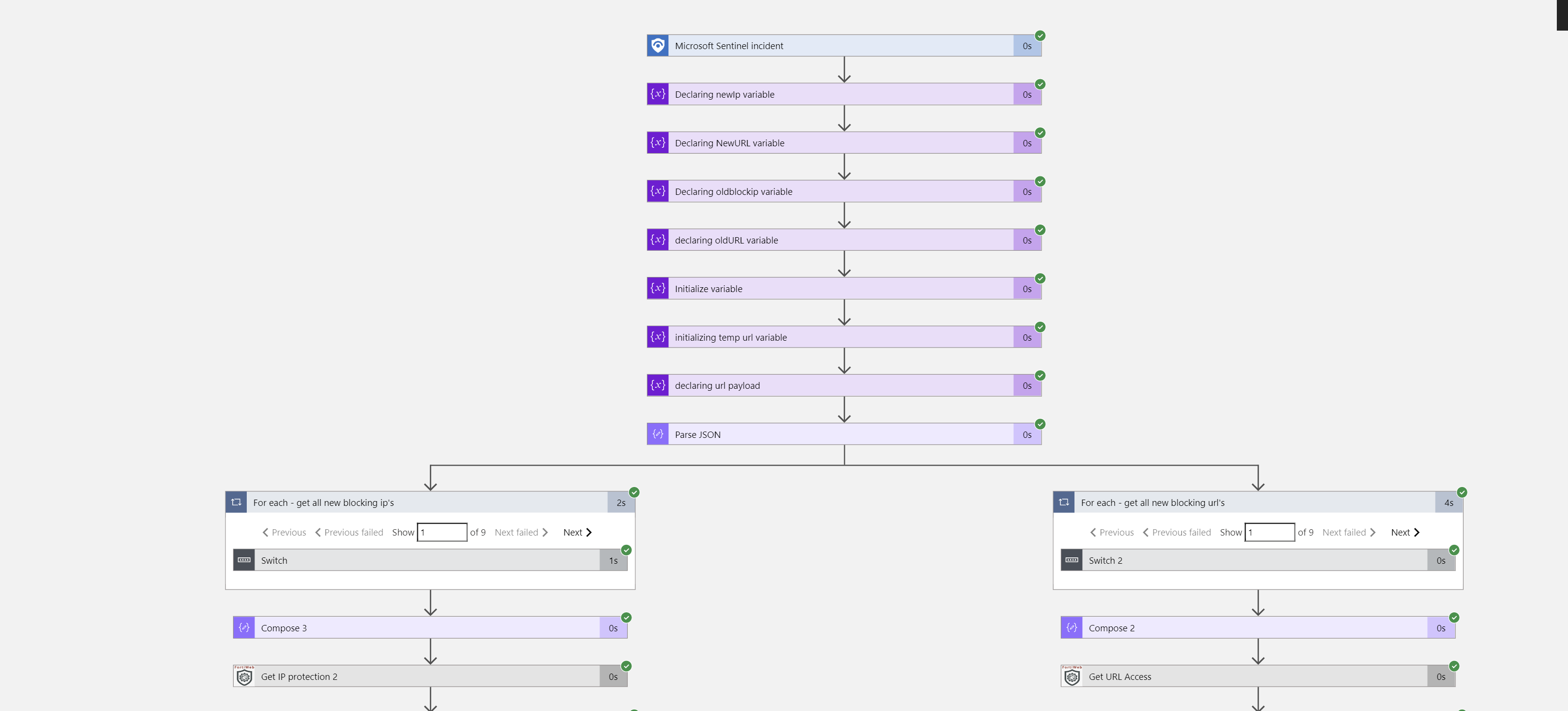
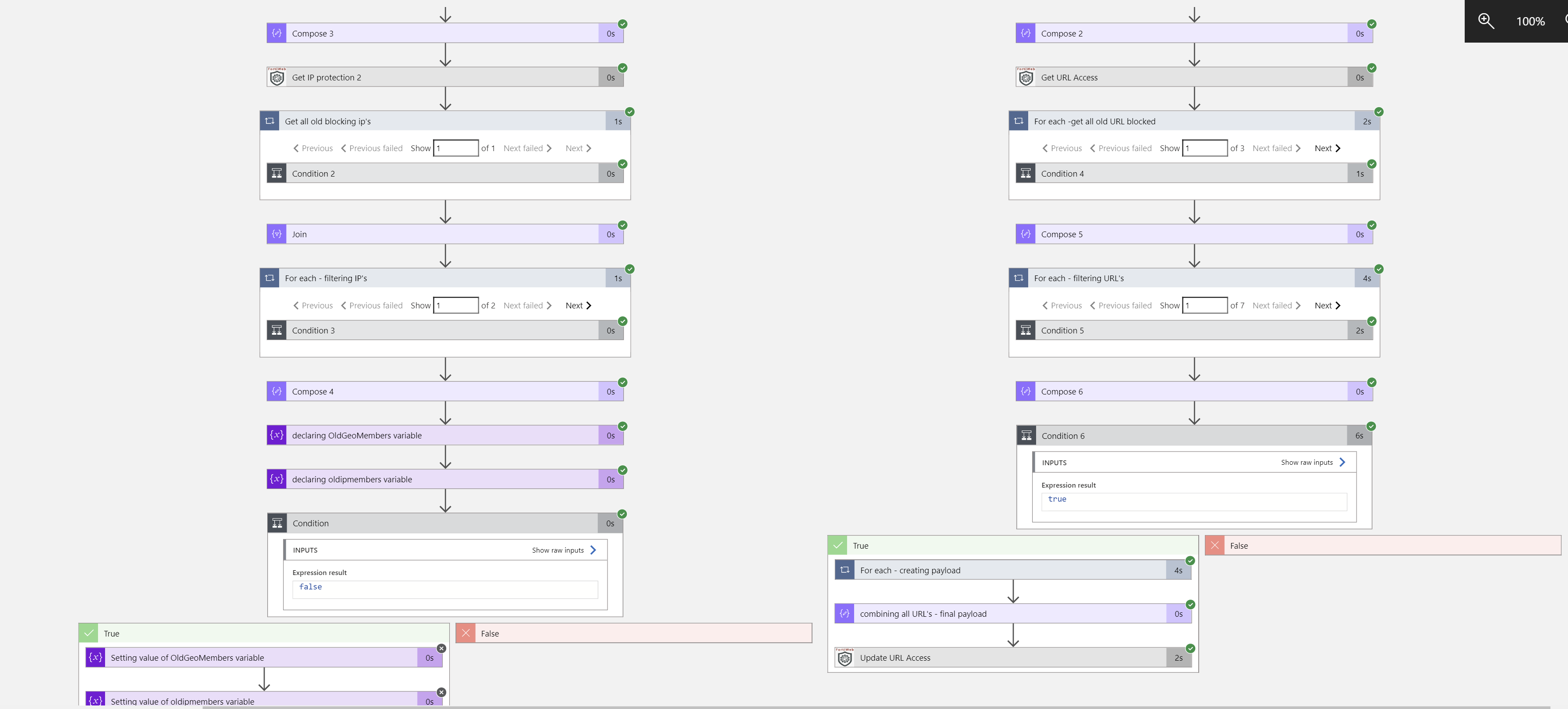
This Playbook Provides the automation on blocking the suspicious/malicious IP and URL on fortiweb cloud waf
| Attribute | Value |
|---|---|
| Type | Playbook |
| Solution | Fortinet FortiWeb Cloud WAF-as-a-Service connector for Microsoft Sentinel |
| Source | View on GitHub |
Logic App Connectors
This playbook uses 3 Logic App connectors / built-in actions:
| Connector / Action | Type | Connections | Actions |
|---|---|---|---|
azuresentinel |
Managed | 1 | 2 |
fortiweb |
Managed | 0 | 4 |
FortiWebCloud |
Custom | 1 | 0 |
Action parameters (URLs, paths, function IDs)
azuresentinel (Managed)
| Action | Method | Endpoint | Other |
|---|---|---|---|
| Add_comment_(IP)to_incident(V3) | post | /Incidents/Comment |
— |
| Add_comment_(URL)to_incident(V3)_2 | post | /Incidents/Comment |
— |
fortiweb (Managed)
| Action | Method | Endpoint | Other |
|---|---|---|---|
| Update_IP_Protection | put | /v1/application/@{encodeURIComponent(parameters('ep_id'))}/ipprotection |
— |
| Update_URL_Access | put | /v1/application/@{encodeURIComponent(parameters('ep_id'))}/urlaccess |
— |
| Get_IP_protection_2 | get | /v1/application/@{encodeURIComponent(parameters('ep_id'))}/ipprotection |
— |
| Get_URL_Access | get | /v1/application/@{encodeURIComponent(parameters('ep_id'))}/urlaccess |
— |
Additional Documentation
FortiWeb-BlockIP-URL Info Playbook
Summary
When a new Microosft Sentinel incident is created, this playbook gets triggered and performs below actions
- Fetches the list of earlier blocked or allowed URL's and IP's .
- Fetches the new IP's and URL's from incidents and combined them with existing one and update the access rules .
Prerequisites
- FortiWeb Cloud Custom Connector needs to be deployed prior to the deployment of this playbook under the same subscription.
- API key. To get API Key, login into your FortiWeb cloud instance dashboard and navigate to Global --> system settings --> API Key.
Deployment instructions
Deploy the playbook by clicking on "Deploy to Azure" button. This will take you to deplyoing an ARM Template wizard.
Fill in the required paramteres:
- Playbook Name: Enter the playbook name here (Ex: FortiWeb-BlockIP-URL)
- Custom Connector Name: Enter the FortiWeb custom connector name here (Ex: FortiWebCloud)
Post-Deployment instructions
a. Authorize connections
Once deployment is complete, you will need to authorize each connection.
- Click the Microosft Sentinel connection resource
- Click edit API connection
- Click Authorize
- Sign in
- Click Save
- Repeat steps for Fortiweb Api Connection (For authorizing the Fortiweb API connection, API Key needs to be provided)
b. Configurations in Sentinel
- In Microosft Sentinel analytical rules should be configured to trigger an incident with risky URL or IP Address.
- Configure the automation rules to trigger this playbook , mapping of IP and URL entities is necessary
Browse: 🏠 · Solutions · Connectors · Methods · Tables · Content · Parsers · ASIM Parsers · ASIM Products · Logic Apps · 📊
↑ Back to Playbooks · Back to Fortinet FortiWeb Cloud WAF-as-a-Service connector for Microsoft Sentinel